Showing posts with label Computer tricks and tips. Show all posts

How to Maintain Your Laptop Battery


One of the most essential factors one needs to consider before making the final decision to go for a particular laptop brand is the battery power capability. This can determine how well you’re going to enjoy using a laptop computer. Many brands can boast of how durable their batteries are over that of their competition, but that does not guarantee that you’ll enjoy longevity in your battery. More than the promise your laptop producer makes about the longevity of its battery, the tips I’m sharing in this article will determine how long your laptop’s battery can last for at a stretch.

Find Serial Key / Cracks for Any Software Using Google..


I am going to explain you that how you can "Find Serial Key / Cracks for Any Software !".I assume that most of you use pirated software. Not everyone can afford buying a program like Photoshop, which costs $699. In this

Some Shortcuts Run Commands


Friends ,here is some useful shortcuts run commands for you .
SHIFT+DELETE ( Delete the selected item permanently without placing the item in the Recycle Bin )
CTRL+C ( Copy )
CTRL+X ( Cut )
CTRL+V ( Paste )
CTRL+Z ( Undo )
CTRL while dragging an item ( Copy the selected item )

CTRL+SHIFT while dragging an item ( Create a shortcut to the selected item )

Windows-7 Theme Creator


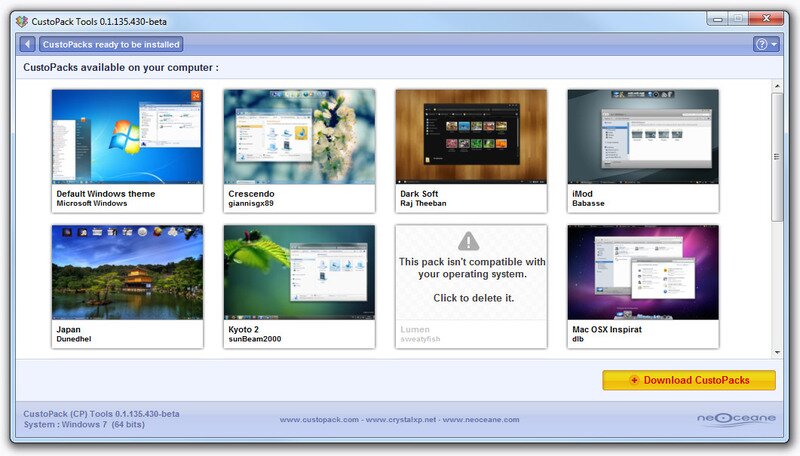
CustoPack Tools is a free software that allows you to easily customize Windows appearance through the installation of packs. Made by the CrystalXP.net team, it is compatible with Windows XP (32-bit), Windows Vista (32 or 64-bit), and Windows 7 (32 or 64-bit).


It splits into 3 parts: 
Choose a CustoPack : designed for general public, this part allows you to install a CustoPack (among those you have downloaded and installed) in order to customize the appearance of your Windows.

Trick to Download Torrent Files With IDM

You all know, How to Download Torrent Files with IDM by Troffic.com but Currently Troffic is Down so we are not able to download Torrent files with IDM. So Here I have another solution for it. Just Follow these belows steps and Download your Torrent File with IDM.
Steps to Download Torrent Files With IDM
  • First, Download the Torrent file which you want to download from any torrent site (Ex. kat.ph, extratorrent)
  • Now, Save this Torrent File on your System, for easy save it on Desktop.
  • Now, go to ZbigZ.com 

Windows XP Secrets


Windows XP Secrets

Notepad Secrets
Create a log
  1. Open Notepad
  2. On the very first line, type in ".LOG" (without quotes) then press Enter for a new line

How to Lock Your PC Using USB.

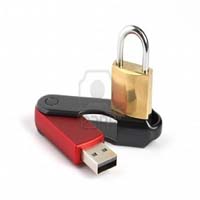
Lock Your PC Using USB. This Is quite a familiar and old method to lock computers . So
 I'm gonna show you how to lock your Pc using a USB . Whenever you need to work on you pc or laptop just insert the pendrive and keep working naturally,but as soon as the USB is removed,The Monitor goes black and all other devices including keyboard and Mouse are Disabled. This is a far far better method that just putting a password.

Features:

  • It Also has a password feature so that you can Start your PC in case your USB is not with you.
  • Disables the USB AUTORUN feature.
  • An alarm is always there to help you is someone enters a wrong password.
  • Also works as a Keylogger.

Lock any Folder Without a Software !


Lock any Folder


Frnds! Here's Trick to Lock folder ,  Using this trick you can Lock any folder Without actually having a software !


              * You must have a LOG-IN password for your user account ! ( the password that is required to start the PC )
Process:

  • Select a Desired folder
  • right click >>>>> properties
  • Sharing
  • Click on " make this folder private button "
  • Apply !
  • Done ! Now every time you try to open the folder, it'll ask for the PC password !

Convert Your Firefox Into a Keylogger


Hey.
Most of you Know what is a keylogger ?   But the problem is most keyloggers are demo and buying them costs a lot. So why not use what we have as what we want ?  This process is too simple to be called a "hack" Still it helps in hacking so Lets Go. !


How it works:

----------------------------------------------- 

  • We just change firefox a lil so that each and every password and email typed are automatically saved.
  • Later we can use Firepasswordviwer to retrieve the passwords.

How to use pendrive as ram memory in windows 7


Hi friends, Windows 7 and Windows vista comes with a ready boost option. Q-What is ready boost
Ans- "ReadyBoost is a disk cache component of Microsoft Windows, first introduced with Microsoft's Windows Vista in 2006 and bundled with Windows 7 in 2009. It works by using flash memory, a USB flash drive,SD card, CompactFlash, external hard drive

Remove Write Protection on USB Drive & Memory Cards


write-protected-driveMany times using your portable devices you get errors like the disk is write protected like in the image on the right hand side. So this can happen anytime due to virus attacks or anything can be the cause. So recently I got main from one of my reader namedsoundararajan so he was asking that his 2GB card has become write protected so what he can do, well there are two ways you can try to remove its write protection so check them below.
Firstly I will recommend checking for any physical lock on that card or USB, because many times company’s provide a lock write attached to the card for making it write protected, so check that up make sure its off and than also if you are not able to copy stuff to your card than follow below methods.


How To Use VLC Players As Video Cutter


Friends ,everybody knows very well about VLC media player .this is fantastic software to watch all kind of  videos format ,music etc . . .
Do you know that you may use VLC players as a video cutter .
This is not a trick .its a function ,which is included in VLC player .
Do you wana try it ?ok ,just follow these steps
Launch VLC media player and activate Advanced controls located under the View menu .
After activate the advanced controls you will see four extra buttons above the normal play/pause button . We will use the first button from the left called the record button .
Now play your desire video ,who you want to cut .
Just click on record button ,from where you want to
cut the video .
Click again record button to stop the recording/cutting .
That's it .its so simple .

All (Ctrl+Alt+Del) Permanently deleted files Recovery solution

Sometimes we delete the files permanently, and realize that deleting them is like a Blunder...

For all those folks,
Here is the solution

Software called "Kissass Undelete" , can bring those files from the hard disk or your flash drive.
Conditions : Only if the data on that drive is not re-occupied(or written). that means the space which was available after the deletion is not been occupied after the deletion.

5 Extreme Tips to Keep Your Computer Virus Free


Keeping your computer virus free in today’s world seems to be a challenge. Your computer is always under attack from crackers from all over the world, each of them trying to take down your machine. The most common method used by them is injecting virus into your computer. So it becomes mandatory to keep your computer virus free.
Viruses are basically of two types, Boot sector virus and Program file virus. Boot sector virus infects the boot files of your computer which helps in the loading of operating system while Program File viruses are made to rest of the things like stealing data, sending cookies etc. So, here are some of the basic and extreme tips to keep your computer virus free. Check them out ;)
Related Posts Plugin for WordPress, Blogger...